

Wall Art Around a TV: How to Balance Screen Light and Sightlines
Quick answer
Treat the television as a changing display, not as passive furniture. Before choosing a canvas, mark the complete media field: the TV, console, soundbar or speakers, fixed shelves, required access areas, and nearby doors or windows.
Test the same artwork footprint with the screen off, with bright static content, and with ordinary moving content. From the main seat, reject a candidate that repeatedly competes with viewing. From the doorway and side approach, reject a layout that turns the TV, canvas, and another room feature into three equal focal points.
Compare one usable side field, an upper field only when it is genuinely complete, an adjacent wall, and the option of no physical art on the media wall. Keep the solution that gives the room interest while the screen is inactive and lets the artwork release attention while the screen is in use. This is the STATE / FIELD / RIVAL / RELEASE method.
What this guide decides—and what it leaves elsewhere
A television wall is different from an ordinary furniture wall because its dominant object changes. The screen may be a near-black reflective rectangle, a bright menu, a quiet scene, fast moving content, or a configured digital-art display. A still room mock-up records only one of those conditions.
This guide decides whether a physical canvas can share that changing sightline, which wall field it can occupy, and what kind of internal structure stays legible without behaving like a second active screen. It does not teach TV mounting, electrical work, cable concealment, fireplace safety, speaker installation, or universal equipment spacing. Manufacturer instructions, wall construction, finished weights, actual hardware, and qualified installation control those decisions.
It also does not replace general size, hanging-height, or gallery-wall mechanics. The screen footprint is not the complete media field; one canvas is not a multi-object gallery envelope; and visual planning is not an equipment-clearance rule.
STATE: test the screen you actually use
Begin with a paper template or accurate digital outline matching one proposed canvas footprint. Keep the template, furniture, lamps, camera, and viewpoint fixed. Change only the screen.
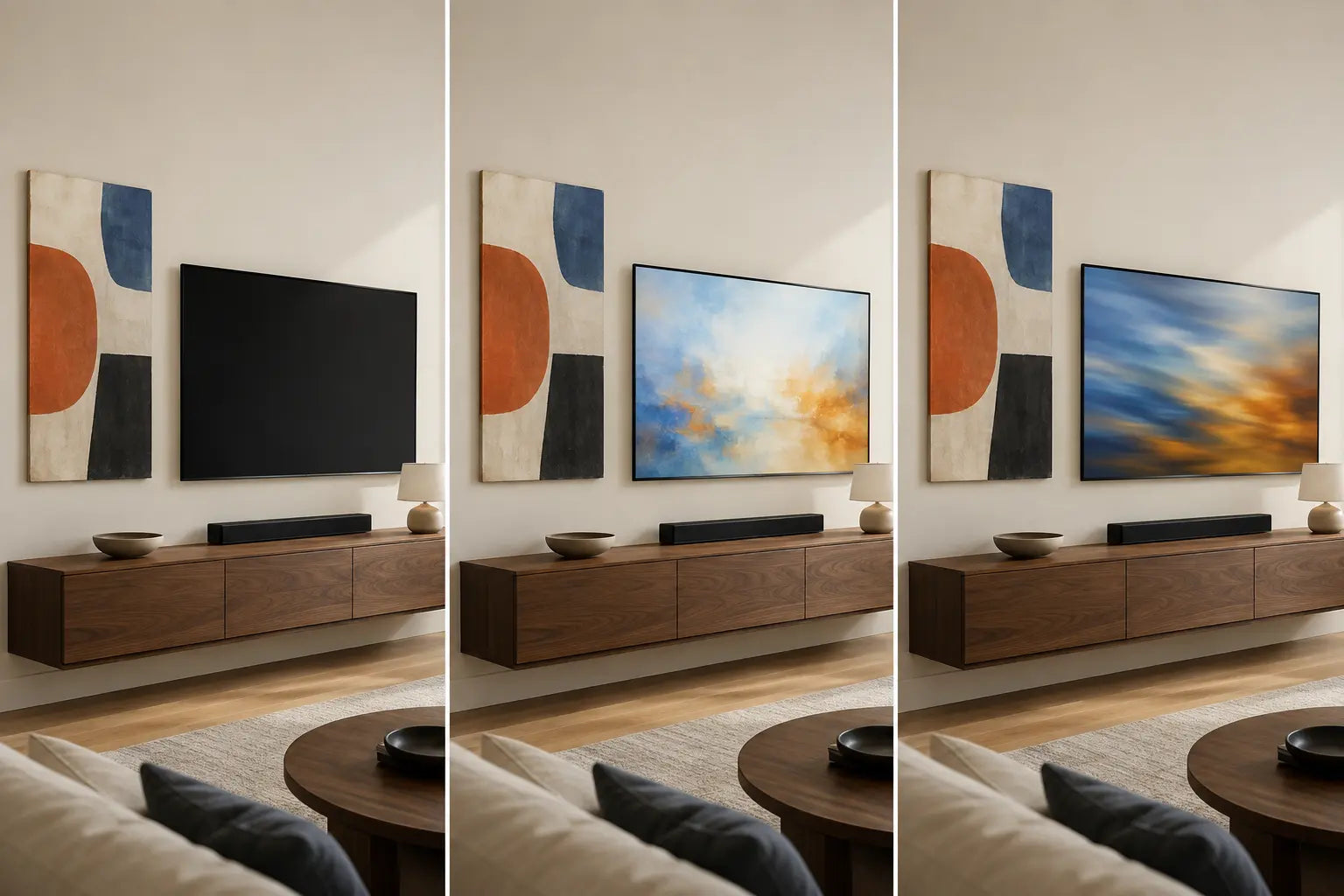
Record three conditions that represent normal use: fully off; a bright but static state such as a menu or paused image; and ordinary moving content. If the television has an art or ambient state that the household genuinely uses, add it as a fourth condition. Supported displays can change appearance according to settings and ambient conditions, so inspect the configured state in the room rather than a showroom photograph.
From the main position, ask whether the canvas’s primary form remains identifiable when the screen is bright, whether it becomes the only object carrying the wall when the screen is off, and whether it repeatedly pulls attention during moving content. Repeat the check from the doorway and one side approach.
A failure should produce one controlled retest. If the canvas disappears during a bright state, compare broader value blocks before adding saturation. If it competes during motion, compare fewer focal points, a calmer outer edge, or another field. Do not change image, size, position, and styling at once.
FIELD: map the installation before mapping the art
The relevant field is not the empty plaster surrounding the screen. It is the complete functional and architectural composition visible from ordinary positions. Draw it on a straight room photograph or mark it with removable tape.
Include the outer TV boundary; the console or cabinet that anchors it; soundbar, speakers, and equipment that remains visible; fixed shelves and lighting; door swings, windows, curtains, wall returns, and circulation edges; plus access and ventilation areas required by the actual equipment instructions. Do not cover vents or substitute a generic internet distance for a model’s instructions. TV mounting and artwork hanging remain separate installation decisions.
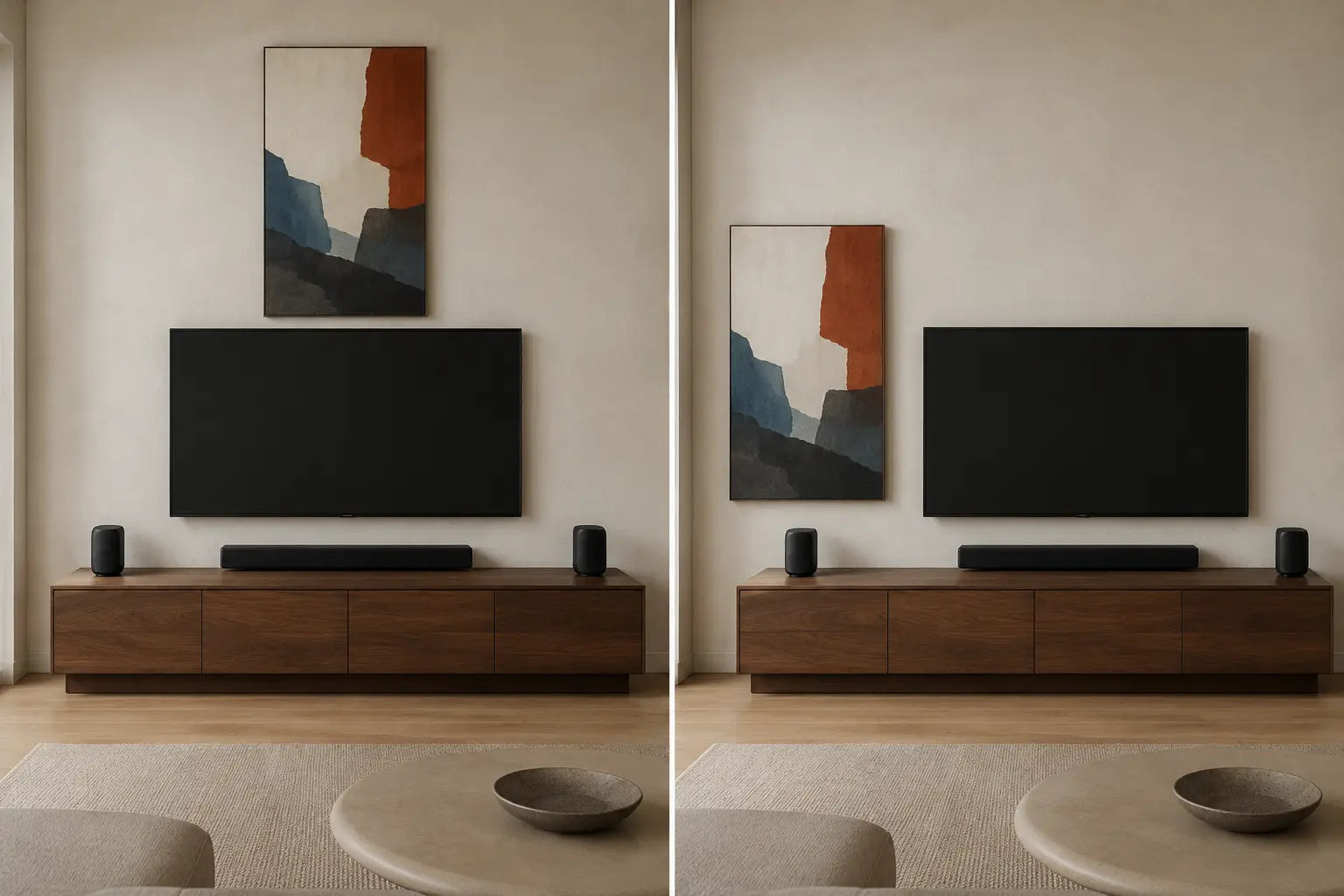
Now identify usable art fields: perhaps one complete side bay, an upper strip, unequal side bays, an adjacent wall, or no useful space on the media wall. A canvas centered on the television may be off-center from the console; a pair aligned to the console may crowd a doorway. Neither center wins automatically.
After the field survives this audit, use the wall art size guide for the complete outer footprint and the hanging-height guide for the separate placement calculation. This article does not replace them with a TV-specific ratio.
RIVAL: test competition from the primary seat
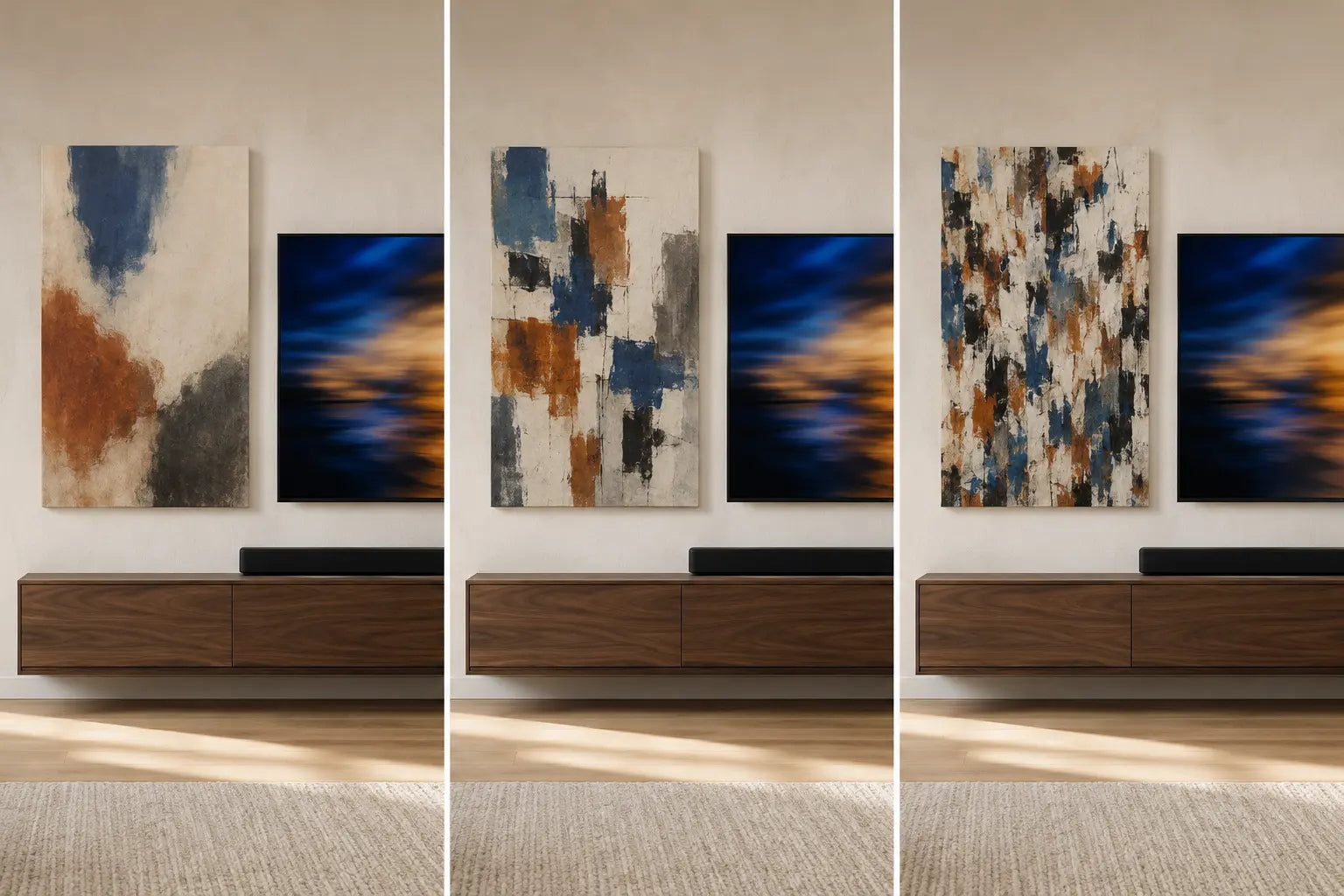
RIVAL is not a ban on dark, colorful, or expressive art. A pale monochrome image can compete through tight lines, repeated faces, typography, or a hard outer boundary. A dark work can remain secondary when it has one connected mass and a clear field around it. Test the exact image-position combination, not the style label.
Sit where the screen is normally watched and use ordinary content rather than a slow demo selected to flatter the room. Notice whether the canvas repeatedly enters awareness because of four observable variables:
- Focal count: several faces, symbols, or high-contrast objects demand separate readings.
- Mark frequency: many small strokes or repeated shapes stay active in peripheral view.
- Edge contrast: a sharp light-dark boundary beside the TV behaves like another frame.
- Proximity: even a quiet canvas can compete when its edge collapses into the screen field.
A failure does not condemn the artwork. Keep the footprint and move it, keep the position and compare broader forms, or keep the image and test the adjacent wall. The abstract living-room guide owns the wider composition shortlist; here, the screen-on view is the veto.
On a narrow screen, scroll this table horizontally to inspect every decision column.
| Observed conflict | First failed stage | Hold | Controlled change | Reject when | Retest |
|---|---|---|---|---|---|
| Canvas works only with TV off | STATE | Image, footprint, room, view | Screen state | Bright or moving content erases the art | Normal on/off sequence |
| Art crowds equipment | FIELD | TV, console, speakers, access | Canvas position | No complete independent field remains | Seat and entry view |
| Canvas behaves like another screen | RIVAL | Footprint, position, program | Internal mark frequency | Gaze repeatedly leaves normal viewing | Same program and seat |
| Wall looks balanced only in one crop | RELEASE | Installation and canvas | Viewpoint or wall field | Doorway creates equal focal centers | Seat, entry, side route |
| Every option feels added-on | RELEASE | Essential media system | Remove physical art | The open wall has clearer hierarchy | Off and moving states |
RELEASE: choose the position that can become secondary
RELEASE asks whether art can carry interest while the screen is inactive and become clearly secondary during use. Keep the canvas and approximate footprint stable while comparing fields. The goal is not to disguise every black rectangle or fill every leftover strip.
Review the accepted option from the primary seat, entry, and opposite route, then repeat it with the television off and during moving content. If no media-wall placement survives, relocate the art or leave the wall open. That is a successful decision, not an unfinished room.
KEEP
Use when: one position works across normal screen states and views.
Reject if: the verdict depends on one staged screen image or crop.
MOVE
Hold: canvas and footprint; test another complete bay.
Reject if: the new position enters trim, equipment, or another focal field.
REDUCE
Change: one secondary art or console layer, not the entire room.
Reject if: editing accessories conceals a failed canvas-screen relationship.
SEPARATE
Use when: an adjacent wall gives art its own routine sightline.
Reject if: it then competes with another open-plan zone.
LEAVE BLANK
Use when: the media wall already forms a complete composition.
Reject the purchase: when every candidate becomes filler or a rival.
Six evidence-led TV-wall decisions
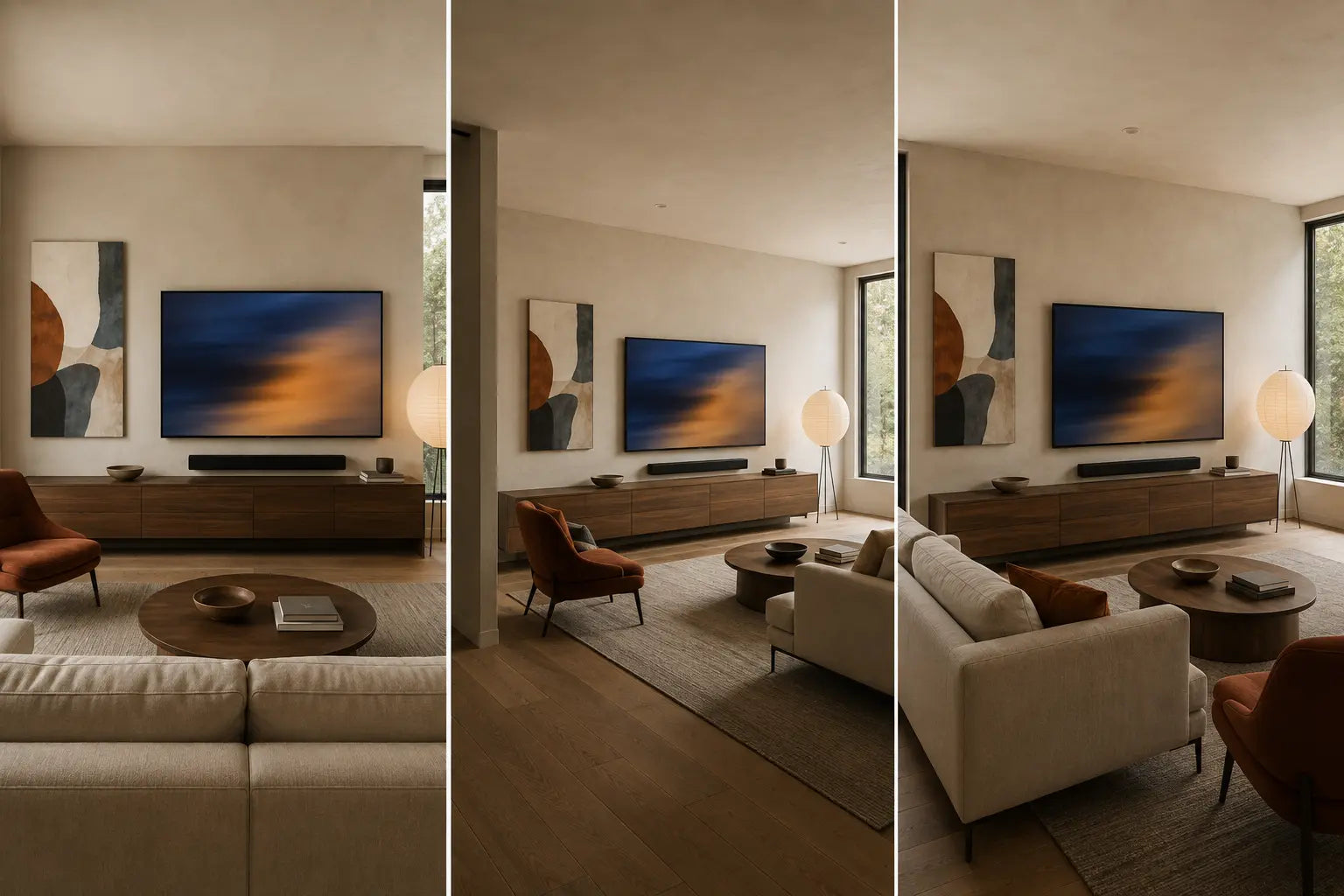
Each case starts with a different constraint. Preserve the evidence, make one decision, define a visible rejection, and retest from the position that exposed the problem.
1. Centered TV and console on a wide wall
Evidence: The installation is symmetrical, with complete side bays and no doorway conflict.
Decision: Compare one side canvas with a restrained pair at a similar total footprint; run moving content before choosing symmetry.
Reject: The pair turns the TV into the middle item of a three-part gallery during viewing.
Retest: Keep one canvas on the normal approach side; reduce console objects before restoring a second work.
2. Large screen with a shallow strip above
Evidence: The obvious empty band is limited by a ceiling, cornice, shelf, or wall projection.
Decision: Tape the exact footprint and judge whether the upper work remains fully readable from the seat.
Reject: The canvas becomes a compressed stack or a miniature chosen only to fill a strip.
Retest: Move the same footprint to a perpendicular wall and let the media wall become the pause.
3. Off-center TV beside a window or door
Evidence: Architecture removes one side; the console may align with the screen while the full wall does not.
Decision: Use the one complete art bay instead of manufacturing symmetry across the opening.
Reject: A canvas camouflages the offset but crowds trim, curtains, or a moving door.
Retest: Align to the usable bay; if the wall still reads as accidental, give the art another wall.
4. TV with regularly used art mode
Evidence: Digital art appears while inactive, but programs, menus, and a fully off state still occur.
Decision: Add the household’s configured display as one STATE and compare several digital images that actually rotate.
Reject: The physical arrangement works only with one staged digital image or assumes identical screen and canvas surfaces.
Retest: Reduce physical art to one supporting work and check again after the digital image changes.
5. Open-plan room with a side approach
Evidence: The screen is primary from the sofa but appears obliquely before the seating zone from dining or entry routes.
Decision: Let RIVAL control the seated view and RELEASE control the route.
Reject: Art is calm from the sofa but merges with the TV edge from the doorway or competes with dining-zone art.
Retest: Move it along the return wall, hold the footprint stable, and use the open-plan wall-art guide for the wider zone hierarchy.
6. TV, soundbar, speakers, shelves, and styling
Evidence: Equipment, books, objects, and multiple hard edges already occupy the apparent empty area.
Decision: Map essential equipment first, then add back one object group and one canvas in sequence.
Reject: Art blocks required access, crowds equipment, or adds another small-object rhythm.
Retest: Use one clearly bounded canvas beyond the field, or keep the media field open and follow the exact equipment instructions.
Build a buying brief before opening product pages
- Screen record: off, bright static, moving content, and configured art state if used.
- Complete field: fixed media equipment, architecture, and exclusions.
- Eligible position: one side, upper field, adjacent wall, or no media-wall art.
- Intended role: separate object, supporting mass, or deliberate counterweight.
- Outer footprint: the whole canvas or group, not image area alone.
- Internal requirement: approved value blocks, focal count, mark frequency, and edge behavior.
- Sightlines: primary seat, entry, and opposite route.
- Rejection sentence: one observable condition that stops the purchase.
Equal-condition shortlist
Compare exactly three available works in the same orientation, approximate footprint, room photograph, and position. Confirm current dimensions, crop, panel count, construction, edge content, hardware information, and care details on each listing.
After the location is fixed, use the canvas versus framed print guide for surface, outside footprint, weight, and care.
Frequently asked questions
Can wall art go beside a TV?
Yes. A complete side bay can give the canvas its own boundary while keeping it in the same room composition. Test the exact footprint with the screen off, bright, and moving, then from the primary seat and approach. Move it if the two rectangles collapse into one crowded field.
Should art be centered with the TV or the media console?
Neither alignment wins automatically. The console, screen, speakers, doorway, and available wall may define different centers. Map the complete FIELD, choose the usable art bay, then use STATE and RIVAL to decide which relationship matters.
Is dark artwork a bad choice beside a black screen?
No. Dark art can work when its value mass, edge, and position remain distinct. A pale work can fail when tight marks or sharp contrast make it a rival. Test internal structure and the off/on states rather than banning a color family.
Should the artwork match the TV dimensions?
Not automatically. The television is one part of a larger installation. A canvas may need to relate to a complete side bay, the console, or an adjacent wall instead. Establish the usable field first; calculate the exact artwork footprint separately.
Can a gallery wall surround a television?
Yes, if the complete group passes STATE and the primary-seat RIVAL test. Treat every perimeter and gap as one installed envelope. First decide whether several works belong here; then use the gallery-wall guide for its specialist layout mechanics.
What changes when the television has an art or ambient mode?
It adds another STATE; it does not erase the others. Test the configured display, ordinary programs or menus, and the fully off screen. Do not assume that every model, setting, digital image, or room behaves alike.
Should artwork go above the television?
Only when FIELD confirms a complete upper area and the canvas remains readable from important views. Reject a shallow leftover strip, a compressed vertical stack, or a position that conflicts with actual equipment requirements. Do not invent a universal gap.
How should the arrangement be tested before buying?
Use an accurate paper or digital footprint in one uncropped room photograph. Hold its size and position stable while changing screen state, then compare the primary seat, doorway, and side route. Make one controlled change after each failure and define the rejection condition before ordering.
Sources and qualification note
Model-dependent display behavior was checked against official Samsung Art Mode guidance. Installation exclusions are intentionally non-numeric: use the exact product manual, official manufacturer guidance such as Samsung’s mounting overview, and qualified help where required.
Laboratory work on motion onset and attention and visual crowding in real-world scenes supplies limited perceptual context for including movement and wider sightlines in the review. It does not establish an ideal TV-wall composition, a wellness effect, or a universal threshold.
The room comparisons are original illustrative controlled studies, not product photographs, measured experiments, television-installation instructions, or evidence that the depicted canvases are currently available. Generated comparison panels are visual decision aids, not pixel-perfect physical experiments; each caption declares the intended held and changed variables.